Set alerts and reminders
Each document can have two reminders. Profile can turn alerts off.
Open alerts on the document
Set an alert so you hear about a renewal before the date, not after you have already lapsed.
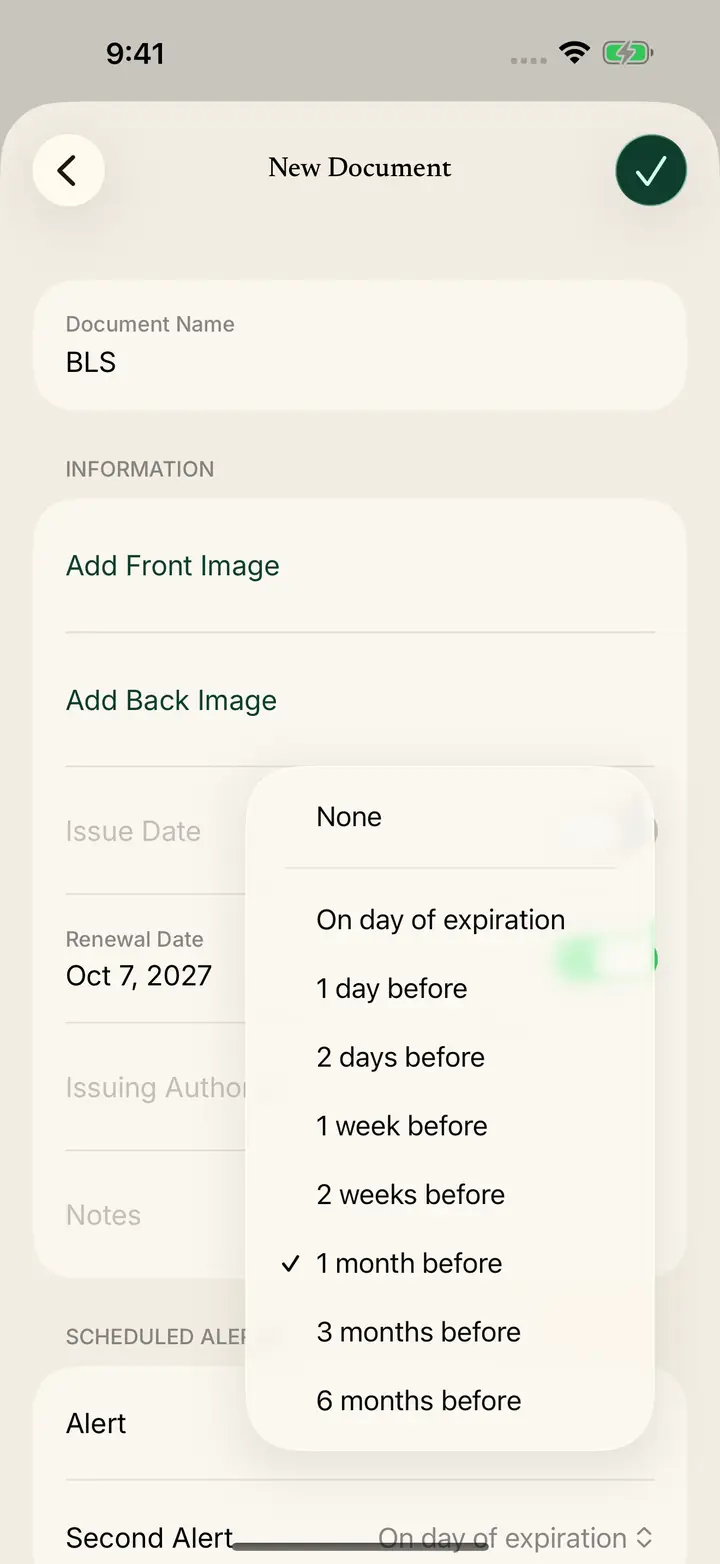
On New Document, Edit Document, or Renew Document, find Scheduled Alerts.
Tap Alert or Second Alert.
Choose when to be reminded
You can choose None, On day of expiration, 1 day before, 2 days before, 1 week before, 2 weeks before, 1 month before, 3 months before, or 6 months before.
Use the second alert for a different time, such as one month before and then on the day it expires.
Save the alert with the document
Edit Document reminds you: Never forget to renew this document by setting a scheduled alert.
The welcome screen says the same thing in short form: scheduled alerts remind you to renew before a credential expires.
Save the document after you pick the times.
Check status without waiting for a notification
Home lists Document Expires Soon under Upcoming.
My Documents has rows for Expired, Expires Soon, Current, and No Expiration.
All Documents splits the list into those same groups.